# Rejoindre le serveur

## 💠 <mark style="color:green;">Ajouter une version 🆕</mark>

### <mark style="color:green;">🔸 Étape 1️⃣</mark>

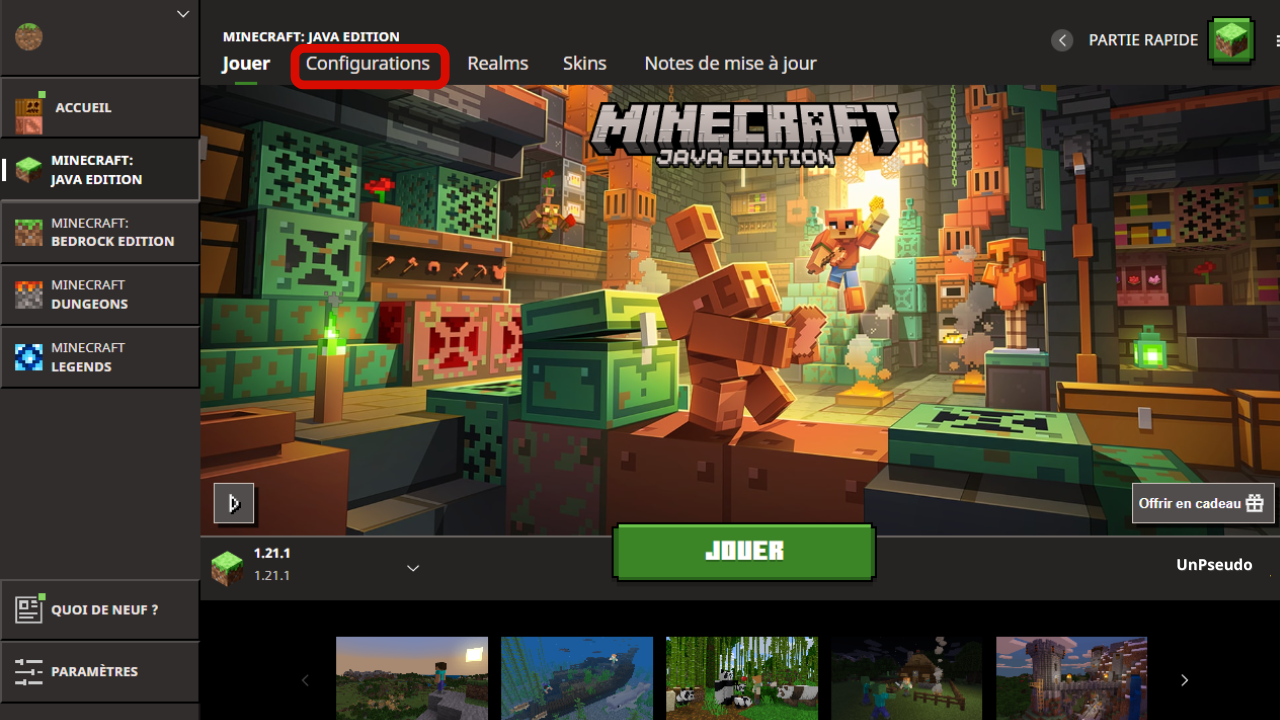
**Lancez votre&#x20;**<mark style="color:green;">**launcher Minecraft**</mark>, puis cliquez sur l'onglet <mark style="color:green;">**"Configuration"**</mark> comme montré sur l'image ci-dessous.

<figure><img src="https://1419017781-files.gitbook.io/~/files/v0/b/gitbook-x-prod.appspot.com/o/spaces%2FWDCPP1UhDKxDeceEGeZc%2Fuploads%2Fgit-blob-07c2acb6885d625558e34e7b5288cbefcc2eb27f%2FLauncherMC.png?alt=media" alt="" width="600"><figcaption></figcaption></figure>

### <mark style="color:green;">🔸 Étape 2️⃣</mark>

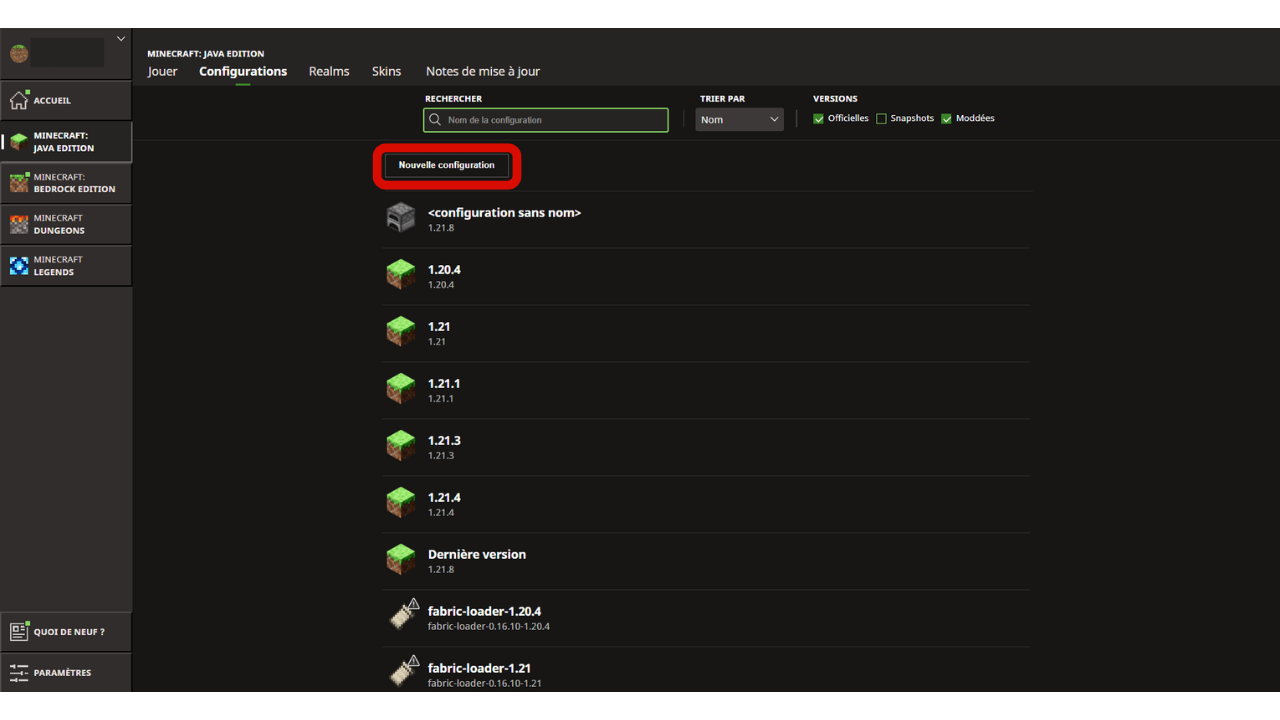
Cliquez sur le bouton <mark style="color:green;">**"Nouvelle configuration"**</mark>.

<figure><img src="https://1419017781-files.gitbook.io/~/files/v0/b/gitbook-x-prod.appspot.com/o/spaces%2FWDCPP1UhDKxDeceEGeZc%2Fuploads%2Fgit-blob-1583f1c434ec80a23b491c06cf9624f4653f98a5%2FConfigurations.png?alt=media" alt="" width="600"><figcaption></figcaption></figure>

### <mark style="color:green;">🔸 Étape 3️⃣</mark>

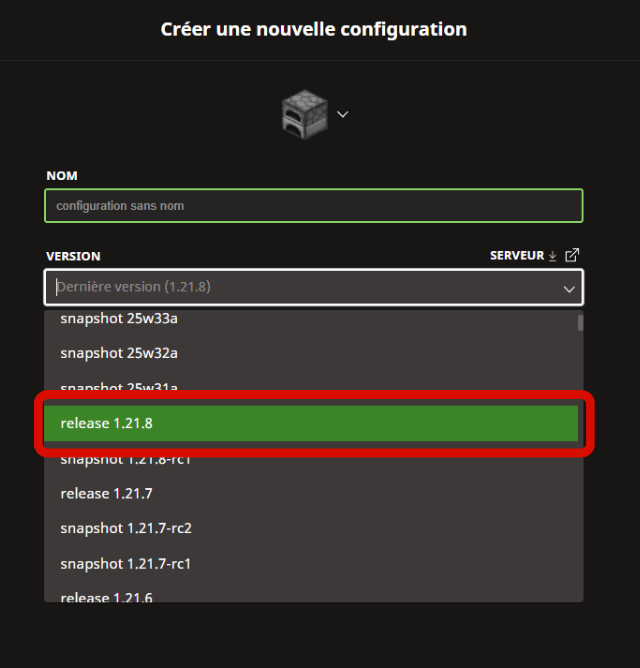
Cliquez sur la case <mark style="color:green;">**"Version"**</mark>, puis sélectionnez la version <mark style="color:green;">**"release 1.21.8"**</mark>.

<figure><img src="https://1419017781-files.gitbook.io/~/files/v0/b/gitbook-x-prod.appspot.com/o/spaces%2FWDCPP1UhDKxDeceEGeZc%2Fuploads%2Fgit-blob-490688a80ce0c7731287f93bae716829b5b65a55%2FVersion.png?alt=media" alt="" width="600"><figcaption></figcaption></figure>

### <mark style="color:green;">🔸 Étape 4️⃣</mark>

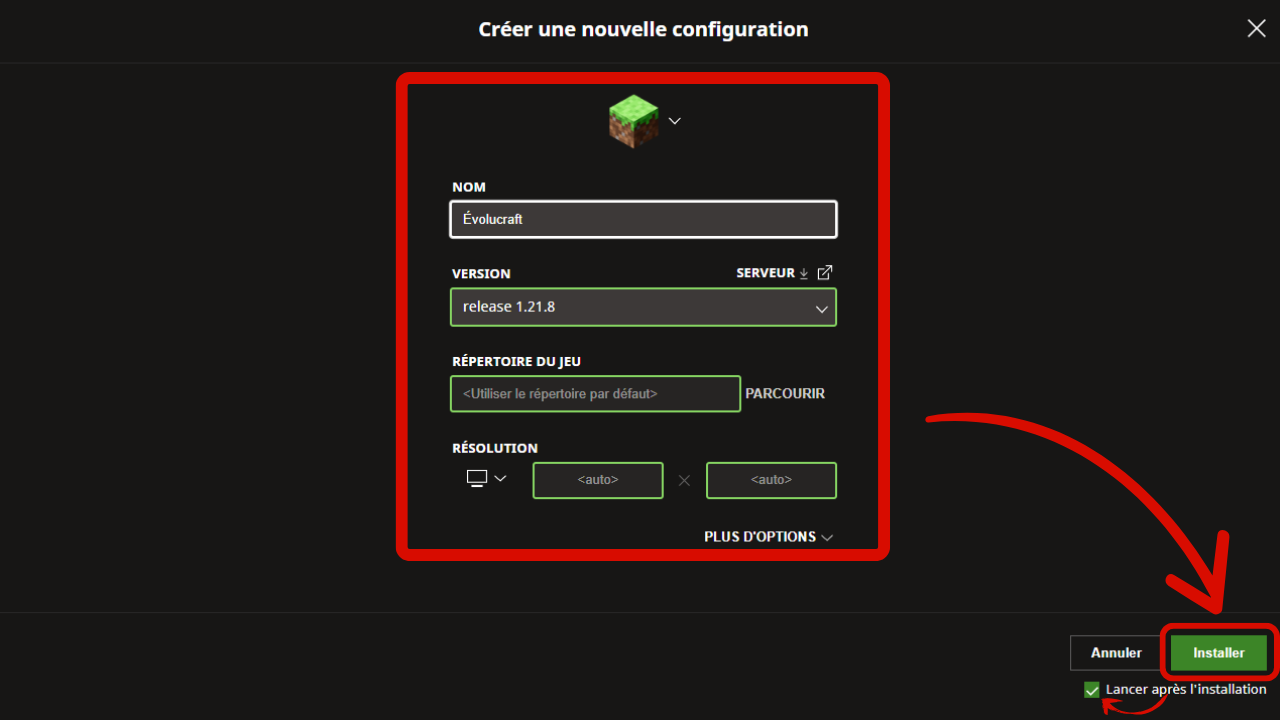
Après cette étape, il ne vous reste plus qu’à cliquer sur le bouton <mark style="color:green;">**"Installer"**</mark> en bas à droite, et votre jeu se lancera automatiquement.

<figure><img src="https://1419017781-files.gitbook.io/~/files/v0/b/gitbook-x-prod.appspot.com/o/spaces%2FWDCPP1UhDKxDeceEGeZc%2Fuploads%2Fgit-blob-9ee3bfeeeb132fdd0276933bb16cda22ef92ab25%2FConfVersion.png?alt=media" alt="" width="600"><figcaption></figcaption></figure>

## 💠 Ajouter le serveur

### <mark style="color:green;">🔸 Étape 1️⃣</mark>

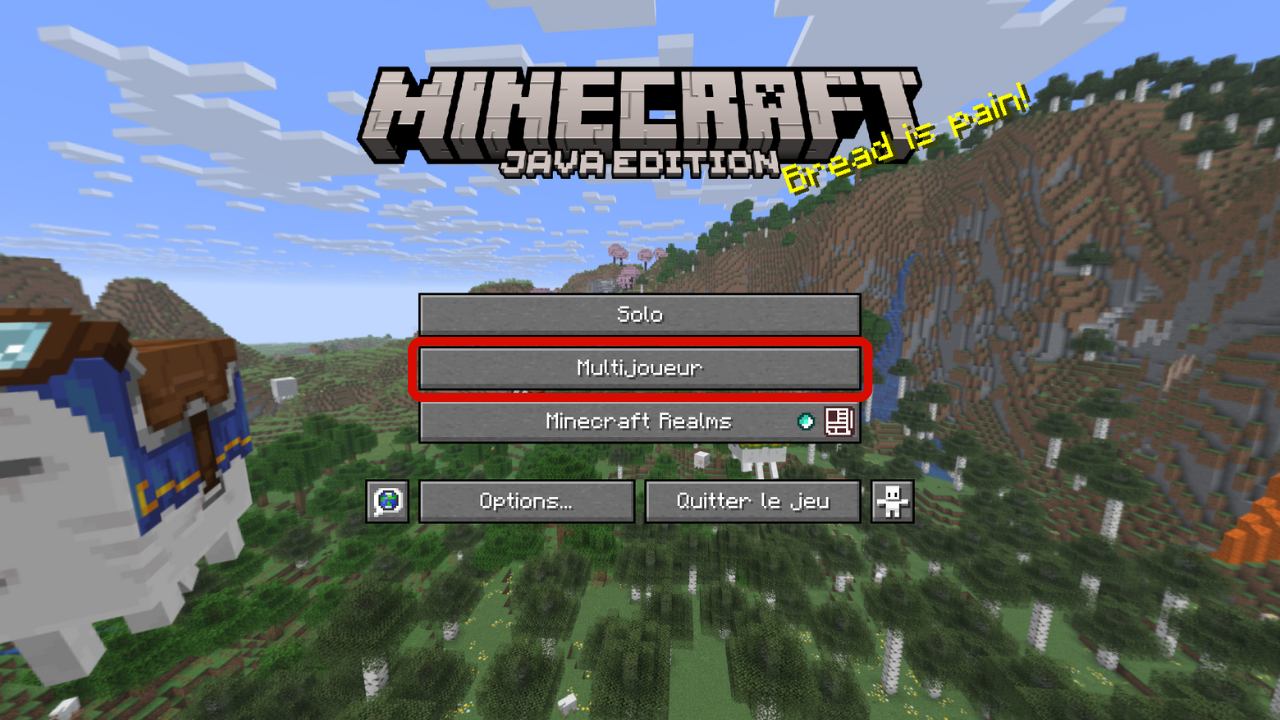
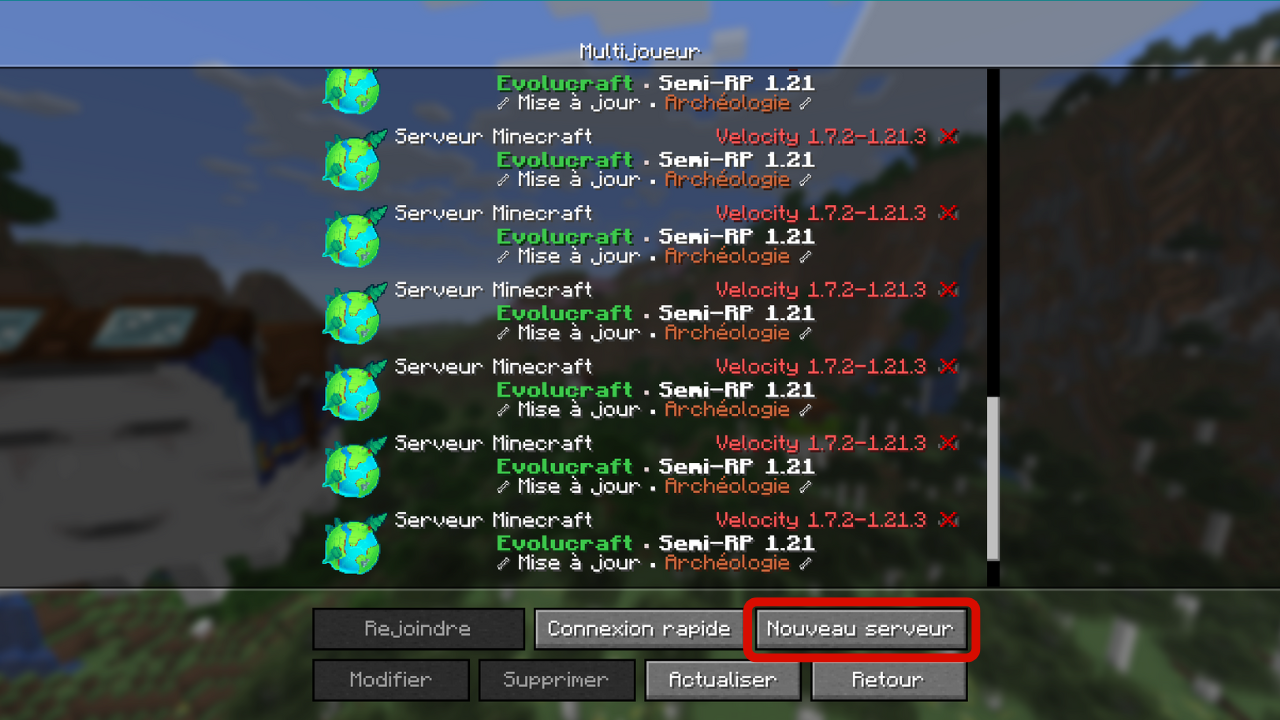
Une fois votre jeu lancé, cliquez sur <mark style="color:green;">**"Multijoueur"**</mark>, puis en bas sur <mark style="color:green;">**"Nouveau serveur"**</mark>.

<figure><img src="https://1419017781-files.gitbook.io/~/files/v0/b/gitbook-x-prod.appspot.com/o/spaces%2FWDCPP1UhDKxDeceEGeZc%2Fuploads%2Fgit-blob-d30fc2f043bc38e167f73b8fca88a6032cd89f94%2Fmenu_multi.png?alt=media" alt="" width="600"><figcaption></figcaption></figure>

<figure><img src="https://1419017781-files.gitbook.io/~/files/v0/b/gitbook-x-prod.appspot.com/o/spaces%2FWDCPP1UhDKxDeceEGeZc%2Fuploads%2Fgit-blob-8c18e6bc2357734cf624fd465d8d6d824a499ac7%2Fadd_serveur.png?alt=media" alt="" width="600"><figcaption></figcaption></figure>

### <mark style="color:green;">🔸 Étape 2️⃣</mark>

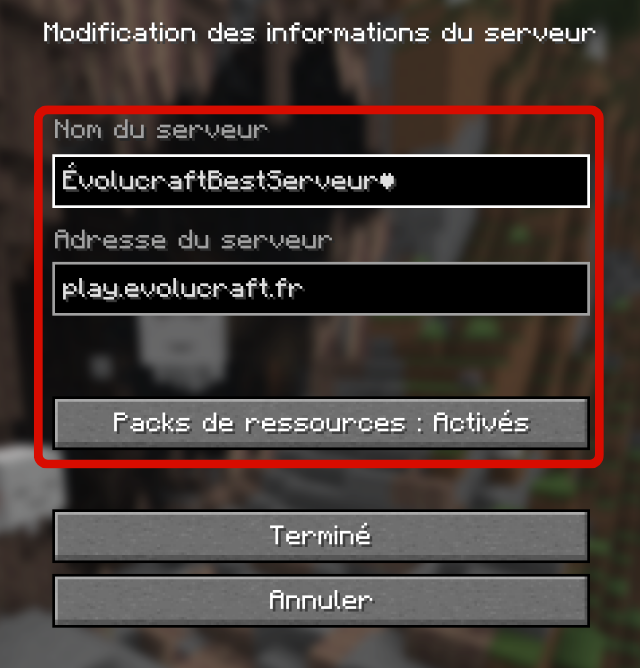
Entrez les informations comme ci-dessous, puis activez l’option <mark style="color:green;">**Pack de ressources**</mark> en la mettant sur <mark style="color:green;">**"Activé"**</mark>. Une fois cela fait, cliquez sur <mark style="color:green;">**"Terminé"**</mark>.

<figure><img src="https://1419017781-files.gitbook.io/~/files/v0/b/gitbook-x-prod.appspot.com/o/spaces%2FWDCPP1UhDKxDeceEGeZc%2Fuploads%2Fgit-blob-e005e9814747ae86aa69ca64c07bba1305effb48%2Fip_serveur.png?alt=media" alt="" width="600"><figcaption></figcaption></figure>

### <mark style="color:green;">🔸 Étape 3️⃣</mark>

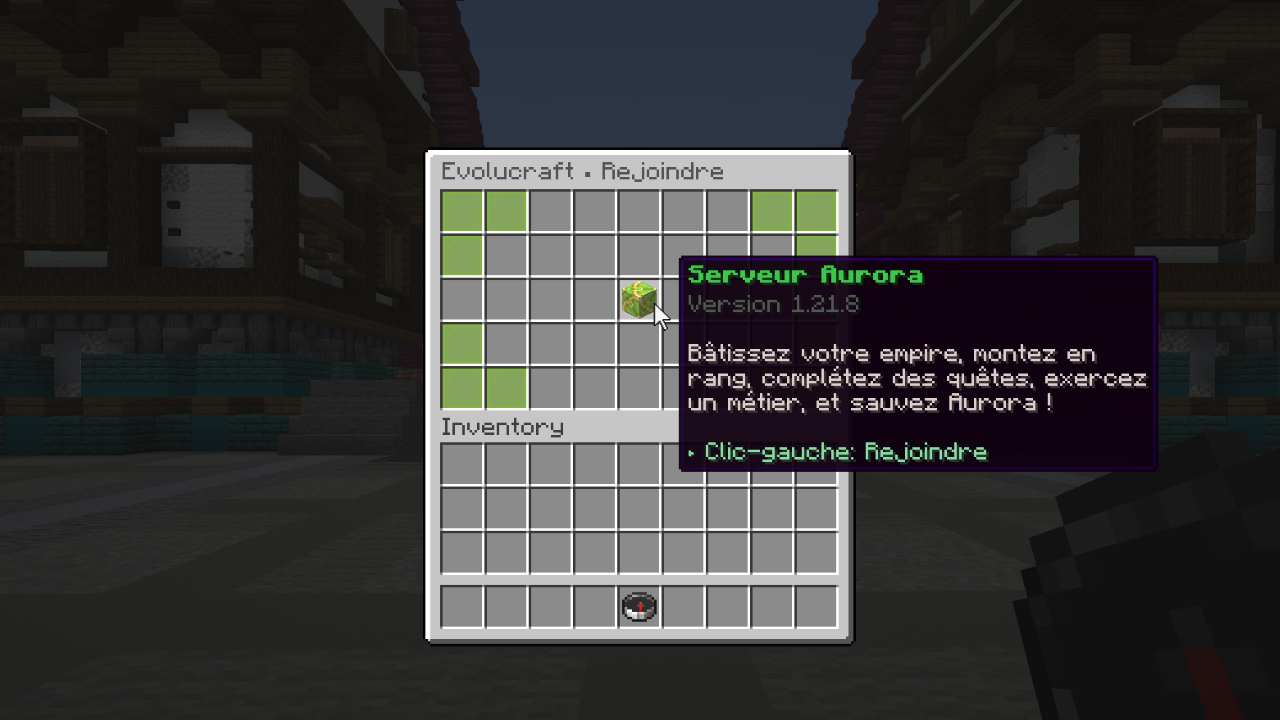
Rejoignez le serveur en effectuant un <mark style="color:green;">**double clic**</mark> sur celui-ci. Une fois arrivé dans le <mark style="color:green;">**lobby**</mark>, faites un <mark style="color:green;">**clic droit**</mark> avec la <mark style="color:green;">**boussole**</mark> en main, puis cliquez sur le <mark style="color:green;">**bloc vert**</mark> comme indiqué ci-dessous.

<figure><img src="https://1419017781-files.gitbook.io/~/files/v0/b/gitbook-x-prod.appspot.com/o/spaces%2FWDCPP1UhDKxDeceEGeZc%2Fuploads%2Fgit-blob-521cb059511ba90fccf6bf039435fa6e964c93a6%2Fchoix_monde.png?alt=media" alt="" width="600"><figcaption></figcaption></figure>

## 💠 <mark style="color:green;">Problème de connexion au serveur 😥</mark>

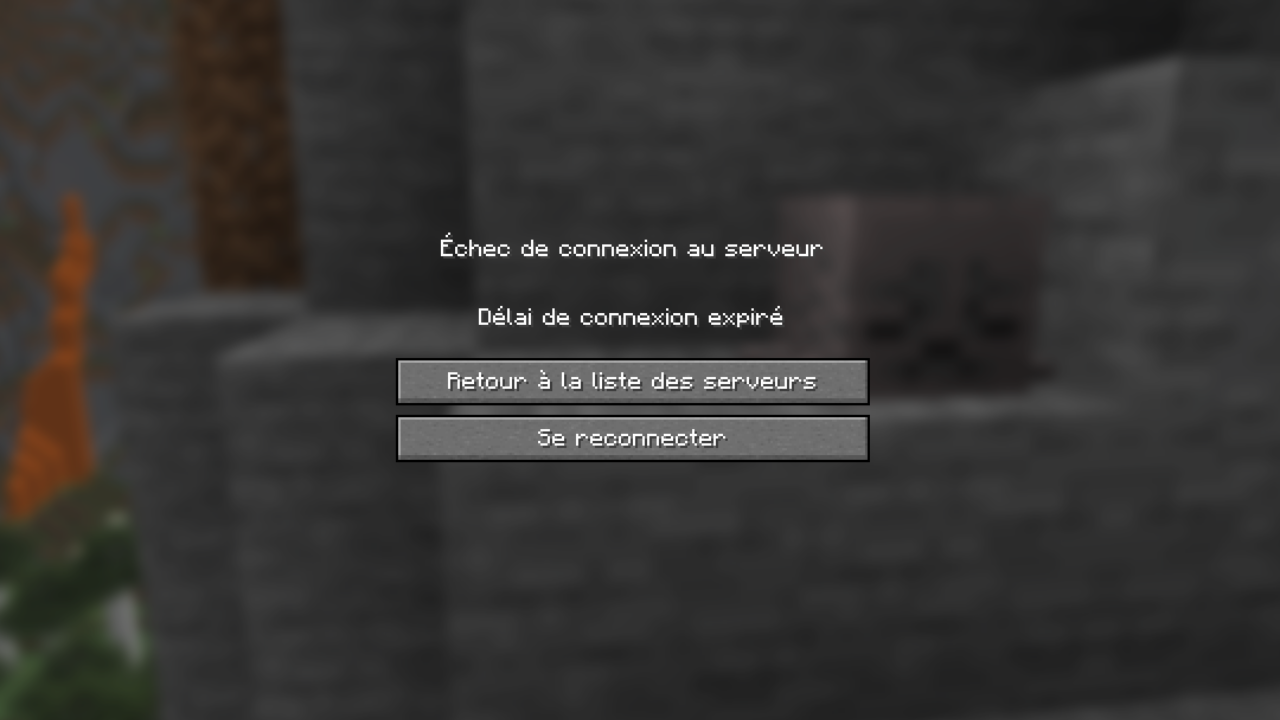
Lorsque vous essayez de vous connecter et que vous tombez sur cette page après plusieurs <mark style="color:green;">**minutes d'attente**</mark>, comme ci-dessous, voici une petite astuce pour résoudre votre <mark style="color:green;">**problème de connexion**</mark> et rejoindre notre <mark style="color:green;">**serveur**</mark> 🤩

<figure><img src="https://1419017781-files.gitbook.io/~/files/v0/b/gitbook-x-prod.appspot.com/o/spaces%2FWDCPP1UhDKxDeceEGeZc%2Fuploads%2Fgit-blob-9501a1501f225dfda22918e31e4ea016d5dea7e6%2Fechec_connexion.png?alt=media" alt="" width="600"><figcaption></figcaption></figure>

### <mark style="color:green;">🔸 Étape 1️⃣</mark>

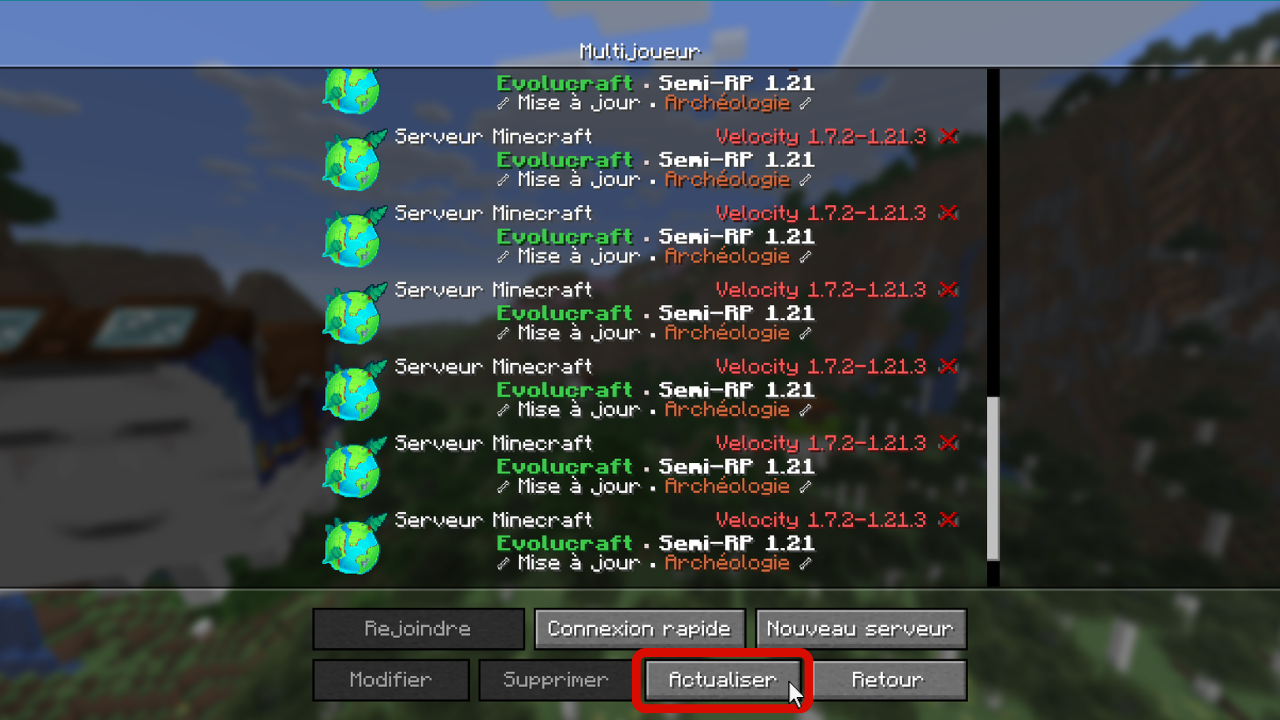
Cliquez sur <mark style="color:green;">**"Retourner sur la liste des serveurs"**</mark>. Ensuite, <mark style="color:green;">**cliquez sur "Actualiser"**</mark> puis <mark style="color:green;">**double-cliquez sur le serveur**</mark> afin de tenter de le rejoindre à nouveau.

<figure><img src="https://1419017781-files.gitbook.io/~/files/v0/b/gitbook-x-prod.appspot.com/o/spaces%2FWDCPP1UhDKxDeceEGeZc%2Fuploads%2Fgit-blob-5b9e570cab73c2a9dfc564699f27983c122cea14%2Fbug_actualisation.png?alt=media" alt="" width="600"><figcaption></figcaption></figure>

### <mark style="color:green;">🔸 Étape 2️⃣</mark>

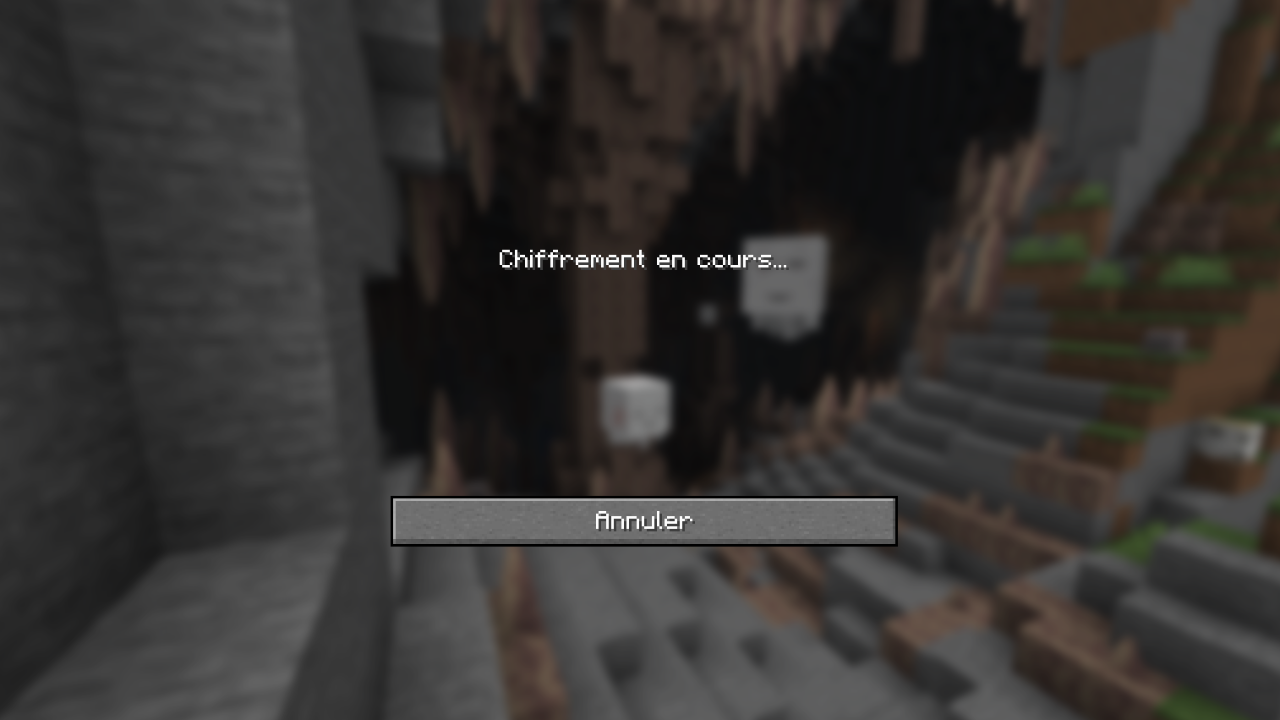
S’il affiche le message <mark style="color:green;">**"Chiffrement en cours"**</mark> (<mark style="color:green;">**"Encrypting"**</mark> si vous avez le jeu en anglais) durant le chargement, comme ci-dessous, cliquez directement sur <mark style="color:green;">**"Annuler"**</mark>.

<figure><img src="https://1419017781-files.gitbook.io/~/files/v0/b/gitbook-x-prod.appspot.com/o/spaces%2FWDCPP1UhDKxDeceEGeZc%2Fuploads%2Fgit-blob-72d51a0f9b3696ece2e514cb7dec1caa9a18ce3f%2Fbug_connexion.png?alt=media" alt="" width="600"><figcaption></figcaption></figure>

### <mark style="color:green;">🔸 Étape 3️⃣</mark>

Répétez l’opération jusqu’à ce que le message <mark style="color:green;">**"Entrée dans le monde"**</mark> s’affiche.

**Vous pouvez dès à présent commencer votre aventure sur Évolucraft ! 🥳**